Implementing a minimal evergreen blog in HTML and Emacs Lisp
Date:
TL;DR
🔗I wanted to rewrite my blog from Jekyll to a minimal set of evergreen tech that won't get outdated in 10 years, while also being able to write posts in Emacs' Org mode instead of Markdown.
I ended up with an elegant solution based on basic html/css/js and Emacs (Lisp) as a build pipeline!
Here I describe how I did it and I also share a template repo1 with full working code you can use to create your own blog.
Time for a new blog post
🔗 Couple of weeks ago, inspiration for writing a blog post hit me. As it does every so. But this time it was different, I was committed: I am writing this one, it has been too long.
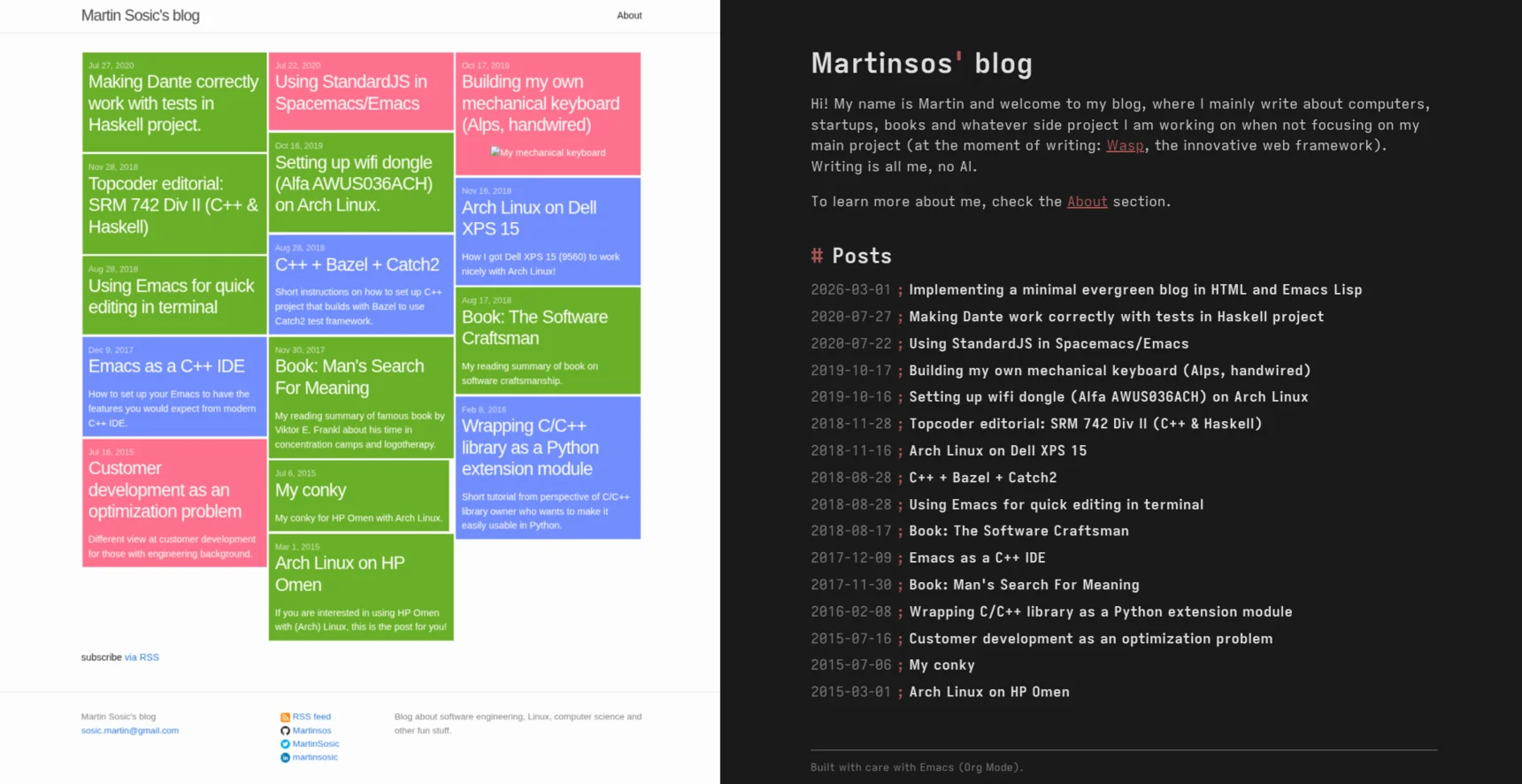
How long that long has really been though, I realized only once I went to make a file copy of my last post: six years! I thought it was no more than a year, max two. While at it, I also remembered that my blog is implemented in Jekyll and that it has a Windows 8 inspired design, both of which I lost the excitement for in the meantime.
Am I to write this new post, special in a way, the first one after a long time, in such a non-exciting environment? Of course not! So instead of finally writing a blog post, I decided I should rather re-do my blog first.
The vision
🔗This is what I came up with for the new version of my blog:
- Minimal: I want it to be minimal, so when I come back to it after again forgetting to write anything for six years, it doesn't feel outdated. Instead, it should be "evergreen". Stable, evergreen tech. Minimal, evergreen design. Hackerish.
- Org mode: I want to be able to write my blog posts in Emacs' Org mode2, which I got to love in the last year or so. Will it be much different from using Markdown, in practice? Probably not. Will I be enjoying typing every single blog post in it though? Absolutely!
I knew getting the second requirement (Org mode) sorted out was going to be harder, so I went after that first. Thankfully, I found a perfect blog post/video3 from System Crafters that explained how to create a simple Org mode driven blog. I expanded further on that and ended up with an implementation of my blog that is a lovely combo of basic web tech (html, css, js) and Emacs (Elisp and Org mode): minimal, simple, using evergreen tech, and hackerish/fun. In the rest of this blog post I will explain how this works.
At the end, I did end up writing that first blog post after 6 years, just that it wasn't the one I imagined at first -> instead, it is the one you are reading right now!
Basic implementation
🔗At the core of it are two things:
- The capability of Emacs to execute a standalone Elisp script, in isolation:
emacs -Q --script myscript.el. Analogous to doingbash myscript.sh. This is what Emacs people mean when they say Emacs is not a text editor, but an (e)lisp runtime with a built-in text editing library. ox-publish, a built-in Emacs package that brings capabilities for exporting org files to various formats, including HTML.
This means that my blog is really just:
- a bunch of
.orgfiles for posts - an Elisp script (
build.el) to convert those org files into html - some static
html/css/jsfiles (and other assets) for the rest of the blog - a
Makefilethat orchestrates it all (development and building)
Here is what that roughly looks like, at its essence:
Makefile
build.el
src/
  index.html
  about.html
  main.css
  posts/
    my-post-1.org
    my-post-2.org
    my-post-2/some-image.png
dist/  # gitignored, this is where the blog is generated.
                            make build
                                |
                                V
                        +--- build.el ---+
src/                    |                |       dist/
  posts/*.org       ----+-- org to html -+---->    posts/*.html
  *.{html|css|...}  ----+----- copy -----+---->    *.{html|css|...}
                        |                |
                        +----------------+
In the build.el file, we have something like this:
;; Built-in package for exporting/publishing of org to html/latex/... .
(require 'ox-publish)

;; Tweaking org-export and org-html options so that produced html fits our needs.
(setq org-html-htmlize-output-type nil ; Don't style the code snippets.
      org-export-with-sub-superscripts '{} ; Require {} around sub/superscripts.
      ;;
      ;; ... likely quite a few more of these ...
      ;;
)

;; Instructions on how to build the blog, i.e. how to export org files in posts/
;; dir to html and how to copy the rest of the files.
(setq org-publish-project-alist
      '(("org-posts"
         :base-directory "./src/posts"
         :base-extension "org"
         :recursive t
         :publishing-directory "./dist/posts"
         ;; org-publish-to-html is a built-in function that converts org to html.
         :publishing-function org-publish-to-html
         :with-title nil
         ;; ... more options tweaking the output usually go here.
        )
        ("static-files"
         :base-directory "./src"
         :base-extension "html\\|css\\|js\\|png\\|jpg\\|gif\\|woff2"
         :recursive t
         :publishing-directory "./dist"
         ;; org-publish-attachment is a built-in function that just copies files.
         :publishing-function org-publish-attachment
        )
       )
)

(org-publish-all)
What I found great here is that ox-publish also comes with the org-publish-attachment function for just copying the static files, so I didn't have to write an additional shell script for doing that, but I can instead do building of the whole blog from one unified Elisp code.
The main thing I didn't find ideal was how much tweaking of default org-export and org-html options I had to do in order to get the exported html (from org) to fit my needs. By default, it produces a quite heavily opinionated and rich html, including default JS and CSS, that were obviously not made with the blog use case in mind. Luckily, with enough tweaking, one can get it into a usable shape reasonably easily, and as is always the case in Emacs, there are also multiple ways to go beyond that if you want to put more effort.
And the Makefile looks something like:
.PHONY build serve publish

build:
        emacs -Q --script build.el

serve:
        # ... something to serve contents of dist locally, for
        #     development, e.g. python-server or browser-sync.

publish:
        # ... something to publish the contents of dist/ to
        #     your server / static hosting provider.
Note that this setup (due to -Q flag) is in no way dependant on or uses my normal Emacs configuration, that I use for editing. It uses Emacs only as an Elisp interpreter for executing build.el, and it doesn't matter what I write the actual blog (posts) with.
This is it at its essence! As mentioned above, this is very similar to the approach described in the System Crafters' blog post3, so check there for more details.
Advanced
🔗In practice, I went further and added quite a few upgrades on top of the essential setup described above, and I will explain these upgrades at the high level below.
For full working code, check out my github template repo1 that I derived from my personal blog implementation described in this blog.
You can try it out easily by checking it out and running make, and if you want to create your own blog in Emacs Lisp, you can use it as a working starting point. Maybe change the design a bit ;).
Syntax highlighting
🔗Org's publishing logic by default highlights the exported code in the html, but that highlighting is quite rudimentary, so I turned it off.
While it could be enriched by configuring Emacs to use more complex highlighting, e.g. via tree-sitter, and then making sure that is exported correctly, I decided it would be much simpler to just do highlighting directly in the browser via JavaScript, independent of Emacs.
For that I ended up using highlight.js, which I downloaded and added to the assets, while making sure it also contains rules for Lisp.
I ended up quite liking how easy highlight.js is to extend. For example I had slight issues with how their lisp language highlighting works, as it wasn't highlighting comments inside quoted lists and some other small things, but it wasn't hard to copy their lisp language definition, rename it to elisp, and add the missing functionality.
I even ended up creating a couple of simple custom languages like dirtree and ascii-diagram.
Fonts
🔗I wanted custom fonts, but in line with my vision of the evergreen blog, I didn't want to link to the external ones, so I added the font (Iosevka) files as assets and made sure they are linked to from the html head.
One thing with Iosevka though is that font files are big, ~1MB each file, to support all the fancy font features. This makes them tricky to use on the web. I wanted 4 styles, Regular, Italic, Bold, BoldItalic, for both propo and mono font, which totals up close to 10MB!
Solution was to "subset" the fonts -> there are tools that can modify the font files to contain only certain subsets of characters (I used fonttools), and merely by picking some reasonable subset that makes sense for web, I achieved 10x reduction in size, which is good enough.
List of posts in Emacs Lisp
🔗Be it generating a list of all the posts on the homepage, generating a sitemap, or generating an RSS feed XML, what you need is a list of posts (their metadata) at the blog build time, in our case in Emacs Lisp, so we can use it in other parts of our build pipeline.
This was as easy as reading all the .org files in src/posts dir, using Org mode to extract the keywords, and then organizing those into a list:
;; ...

(defconst
  blog/all-posts
  (let ((org-files (directory-files (expand-file-name "./src/posts") t "\\.org$")))
    (sort
     (mapcar
      (lambda (f)
        (with-temp-buffer
          (insert-file-contents f)
          (org-mode)
          (let* ((keywords (org-collect-keywords '("TITLE" "DATE")))
                 (title (car (alist-get "TITLE" keywords nil nil #'string=)))
                 (date-str (car (alist-get "DATE" keywords nil nil #'string=)))
                )
            (unless title
              (error "Post %s is missing #+TITLE" f))
            (unless (and date-str (not (string-blank-p date-str)))
              (error "Post %s is missing #+DATE" f))
            (list
             :date (blog/--parse-post-date date-str)
             :title title
             :filename (file-name-nondirectory f)
            )
          )
        )
      )
      org-files
     )
     (lambda (a b) (time-less-p (plist-get b :date) (plist-get a :date)))
    )
  )
)

;; ...
I will show later how I use this data.
index.org
🔗
I started with index.html and about.html, but soon I wanted to also write those in .org, so I turned them into index.org and about.org.
I quite liked that because I could now focus on content instead of the looks, and I anyway prefer them looking same/similar to posts, due to the minimal style of the blog.
And if I need custom html in those files, I can still easily insert it with export html org blocks, or generate it with Elisp org src blocks.
For instance, this enabled me to very elegantly insert html of an automatically generated list of all the posts in the index.org, from the posts metadata list I described in List of posts in Emacs Lisp, via a single elisp code block in index.org:
And then inside an emacs-lisp src block in the index.org file, with :exports results :results html:
(mapconcat
 (lambda (p)
   (let ((date-str (format-time-string "%Y-%m-%d" (plist-get p :date)))
         (title (plist-get p :title))
         (filename (plist-get p :filename)))
     (format (concat "<a class=\"post-entry\" href=\"./posts/%s\">"
                     "  <time datetime=\"%s\">%s</time>"
                     "  <b class=\"post-entry-title\">%s</b>"
                     "</a>")
             (string-replace ".org" ".html" filename)
             date-str
             date-str
             title)))
 blog/all-posts ; Global variable with metadata of all the posts.
 "\n")
Building during development vs for publishing
🔗
I wanted to have incremental rebuild of my blog during development (e.g. to avoid copying images each time), which is already out of the box supported by org-publish and its file timestamp cache, so not much to do there.
On the other hand, I wanted to be sure that when publishing, I am publishing exactly what I want, no extra files from before and similar, which can easily happen when using incremental rebuild.
For that purpose, I added an additional make build-clean command that really does the same thing as my usual incremental rebuild but first deletes the whole dist/ dir and also passes a flag to org-publish that deletes its file timestamp cache.
This way I both got a robust way to make sure I am publishing no less or more than what I wanted + an easy way to "reset" the build during development if things get messed up during incremental rebuilds.
;; ...

(org-publish-all (getenv "ORG_PUBLISH_FORCE"))
build-inc:
        emacs -Q --script build.el

build-clean:
        rm -rf dist/
        ORG_PUBLISH_FORCE=1 $(MAKE) build-inc
Serving locally during development
🔗I hoped I could find a solution for running a local web server, with live reload, that is "evergreen" and requires no additional dependencies, but couldn't find anything that matches those criteria.
Best I found at the end is browser-sync, which I run via make serve like this:
build-inc:
        emacs -Q --script build.el
        date +"%Y-%m-%d %H:%M:%S.%3N" > .last_build_info

# ...

serve:
        npx browser-sync start --server dist --files ".last_build_info" --port 8080
What is that .last_build_info file though, you might be wondering? I just couldn't get browser-sync to properly detect the changes to the source files of my blog, for the purpose of live reload, so I ended up producing this additional "build info" file on every rebuild, which then I have browser-sync watch and react to. A bit of a workaround, but it is robust and is efficient regarding files watched.
Compiling from Emacs during development
🔗I love having a Makefile as a "project runner" because I know there is a single place with defined (and documented) typical commands that I need for my project. It even gets autocomplete in the shell! And it is both very minimal and "evergreen".
Nice thing is that it then also becomes very easy to compile/build your project from the editor/IDE of your choice, you just need to configure it to run specific make commands for that project.
In Emacs, I ended up using the built-in compile functionality, specifically project-compile (and project-recompile) command, which by default runs make -k, meaning I actually had nothing to configure! In practice, that means that all I have to do to rebuild the blog while working on it is to hit a keybinding for project-compile (in my case SPC x P) and that is it.
Org export backend
🔗
By default, ox-publish (ox stands for "org export") is highly opinionated on how it exports org into html, and you will want to turn off all these premade choices.
I started doing this by setq-ing all the individual global vars that tweak how exporting works (org-export-* and org-html-* vars), but then I learned that one can define their own "export backend", which dictates how exporting is performed, and while defining it, extend the existing one.
At the end, I ended up with almost all of the logic in my custom export backend blog/html that derives html backend. This is a more elegant solution as you are not tweaking global vars but can invoke your own backend when you want, and the whole experience of defining it is nicer.
I did still end up with a couple of global vars I had to tweak because they were not tweakable via backend, but that number was now much smaller.
;;; ...
(org-export-define-derived-backend 'blog/html 'html
  :options-alist
  '((:html-doctype nil nil "html5")
    (:html-html5-fancy nil nil t)
    (:html-validation-link nil nil nil)        ; Skip weird default html validation link.
    (:html-head-include-scripts nil nil nil)   ; Skip default JS.
    ;;; ...
   )
)
;;; ...
Making html ids that org-publish generates deterministic
🔗
By default, ox-publish assigns random id to generated html elements, which means that each time you build/publish your blog post, they all will have changed. This means nobody can make a stable reference to any of your html ids, also that each time you are republishing a lot of files even if you changed just one of them, … .
Based on this solution by alphapapa, I solved this problem by advising the org-export-get-reference and org-publish-resolve-external-link functions with my logic that slugifies titles (e.g. "Test title!" -> "test-title") when generating id for a heading and creates sequential counters ("el-0", "el-1", …) for other elements.
This was quite involved regarding understanding Org mode internals, but with the existing starting point by alphapapa and LLM help I was able to get to a solution that seems satisfactory.
Splitting build.el into multiple files
🔗
As it grew, I split build.el into multiple files that require each other, for two main reasons:
- To move "layout" logic into
src/dir together with the rest of the content, away from the build logic in thebuild/dir. - To keep the build logic maintainable and easier to work with (separation of concerns).
# ...
build/
  blog-build.el # Main entrypoint for the build pipeline.
  blog-org-publish-html.el # How we export org to html.
  blog-paths.el # Common file paths.
  blog-data.el # Blog (meta)data available globally (e.g. metadata on all the posts).
  org-export-dtrm-refs.el # Deterministic ids in exported html.
src/
  # ...
  layout.el # Common html head, postamble, reusable pieces of html, ... .
  posts/
    # ...
    layout.el # Posts-specific html preamble, postamble, inner template,  ... .
Doing require correctly
🔗
Most challenging part here turned out to be figuring out how to have the scripts require each other while having it work in all three environments that I cared about:
emacs -Q --script-> the most important since this is what builds the blog.- In-buffer eval -> useful during development.
- Flycheck -> we don't want false errors while editing the buffer.
What made this hard was the mix of these three, especially (1) and (3), since emacs -Q --script is not a common use case, while on the other hand Flycheck performs its analysis in its own environment. If you use usual methods of requiring other files, one of these won't work correctly (e.g. Flycheck).
I ended up going with file-explicit require forms that or over three different ways to get a parent directory, covering all the three environments and satisfying Flycheck during its compile time analysis:
(require
 'other-script
 (expand-file-name "./other-script.el"
                   (file-name-directory (or load-file-name
                                            buffer-file-name
                                            default-directory))))
Verbose, but it was the only solution I found to work, I don't actually use it in so many places so it doesn't feel terrible, and I do like that it is explicit (vs e.g. some kind of separate machinery in .dir-locals.el to trick Flycheck).
I created a small GitHub repo to showcase both the issue and the solution I found.
Generating RSS feed
🔗
Probably the easiest way to enable external parties to subscribe to new posts on your blog is to have an RSS feed (e.g. https://myblog.com/rss.xml).
And ideally that feed would be automatically updated when you add a new post.
We will go one by one through crucial components needed to set up and automatically generate an RSS feed in our blog.
A list of posts metadata in Emacs Lisp
🔗This is the core data we need to generate our RSS feed, and we already set it up in List of posts in Emacs Lisp.
RSS XML generation logic
🔗
Assuming we have a list of posts metadata, we now need to know how to shape it up into RSS XML and write it to rss.xml file.
I won't be posting the whole code here, you can check the full blog code1 if you wish to see it, but it came down to creating a build/blog-rss.el with (defun blog/rss-generate that uses a list of posts metadata we prepared before to generate the RSS XML and write it to dist/rss.xml.
Some interesting parts to mention is not to forget to use xml-escape-string for stuff like post title and description, and then also to make sure to format the dates with RFC-822 format.
Triggering our RSS XML generation logic on each blog (re)build
🔗
Turns out that org-publish's org-publish-project-alist has :completion-function property for triggering custom logic right after building/publishing is done, which is perfect place to run our RSS generation logic!
;;; ...
(setq org-publish-project-alist
      `(("org-posts"                                 ; <- Notice I turned ' into ` here.
         :base-directory "./src/posts"
         :base-extension "org"
         :recursive t
         :publishing-directory "./dist/posts"
         :publishing-function org-publish-to-html
         :completion-function (,#'blog/rss-generate) ; <- We added this.
         :with-title nil
        )
        ;;; ...
       )
)
;;; ...
<link> in <head> to announce the RSS feed
🔗To make our RSS feed easily discoverable to external tools, we need to put a special link in the head:
<link rel="alternate" type="application/rss+xml"
      title="My blog" href="https://myblog.com/rss.xml" />
Performance and SEO optimizations
🔗Finally I did some basic perf/SEO optimizations to achieve a decent Lighthouse score:
- Reduced size of font files by subsetting.
Added helper tool to optimize images for size and format (webp).
I didn't want to complicate build pipeline further with automatic step for image optimization, so I kept it manual.
- Added robots.txt.
- Made highlight.js JS and CSS loading deferred.
Fixed the semantics of main page elements:
emacs-lisp(org-export-define-derived-backend 'blog/html 'html ;; ... (:html-divs nil nil '((preamble "header" "preamble") (content "main" "content") (postamble "footer" "postamble"))) )
Conclusion
🔗At the end, I am really happy how the new version of my blog turned out: I feel like I succeeded in my goal to have something very solid and evergreen while also minimalist. I also had great fun while setting this all up, using Emacs (Lisp) in ways I never had before (standalone scripting), and I love it that I can write posts in Org mode.
The most annoying part was stamping out all the defaults of org-publish exporting to html, while probably the coolest part is that I can inject Elisp code blocks into any page (since they are all *.org) to generate custom html in-place.
This blog is my own personal part of the internet, my act of expression, and it feels like I made it truly my own.
Footnotes:
Org mode is, to oversimplify it, kind of like Markdown on steroids. It is not so easy to shortly explain the extent to which Org mode can go, but it has such a rich and powerful ecosystem built around it that many people use Emacs just for it. You can use it for writing, literate programming, productivity (e.g GTD), note taking, calculations, … .